
Tutorial · Reader
Reader Guide
Tap the page center to show the current top bar and four-button control pill. Writing actions start from text selection, an AI segment's own controls, story-option cards, or the optional paragraph-tail shortcut.
Selection toolbar
Long-press any text and drag to select. The toolbar appears. Actions are split into three groups:
| Group | Actions | Notes |
|---|---|---|
| Local / reading | Highlight · Copy · Share · Ask about this · Select all | Ask about this calls the lightweight/text model; the other listed actions are local |
| AI writing | Continue here · Rewrite · New branch · New chapter · AI command | Continue/Rewrite/AI command call a text model; New chapter only reorganizes text unless you explicitly choose Continue writing |
| Media / More | Image · Audio · Video · Info | Media actions show their own confirmation and use the corresponding image/TTS/video model |
Long-press selection works in both scrolling and paged reading modes.
Rewrite modes and generation form
| Mode | Effect | When to use it |
|---|---|---|
| Expand | Keep the original content and insert a new segment after the selection | Most common: let the plot keep moving |
| Rewrite | Replace the selected paragraph | When you don't like a paragraph and want another version |
| New branch | Old content after this point becomes a read-only branch, and the main line rewrites from here | When you want a major direction change but still want to keep the old route |
Things you can configure in the form (all remember your last choice):
- Instruction: one sentence describing where to go next; leave it blank to let AI improvise.
- Model: model for this run, without changing the global default.
- Prompt template: four built-in templates: balanced continuation / dialogue progression / inner monologue / fast-paced progression. You can edit and customize them.
- Boost prompt: a long-lived style constraint, such as "restrained prose, fewer adjectives"; can apply to the whole book or one run.
- Advanced · Context and length: context token budget, max ratio reserved for following text, and response length reservation.
- Also generate story options: a toggle that adds 3 next-step options after continuation finishes.
Story options
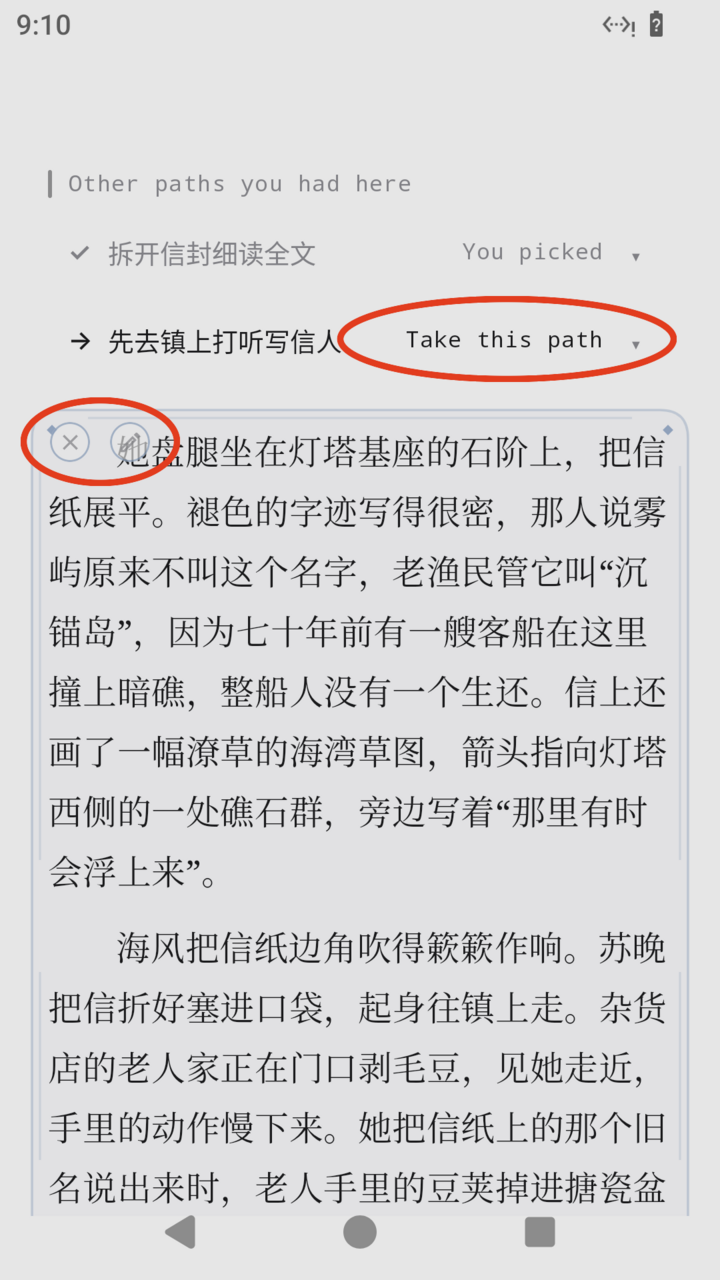
At the end of a branch, or when "Also generate story options" is on, 3 direction cards appear below the text: bold title plus one-line description. Tap any card and it becomes an archived "You chose" card. New story text streams in, then the next group of options appears, letting you read onward like a text adventure. The ↻ beside options regenerates a new set of directions. Everything is written onto the branch; the original text stays unchanged.
AI segment actions
Paragraphs written by AI have a tinted decoration and three actions:
- X Delete this AI segment (with confirmation).
- Edit and regenerate this segment: opens the input bar with the previous instruction prefilled. You can edit text, switch model, and regenerate; older versions become left/right candidates and are not lost.
- Continue from this segment: writes another segment after it, using the same lightweight input bar instead of the full form.
Paragraph-end quick button
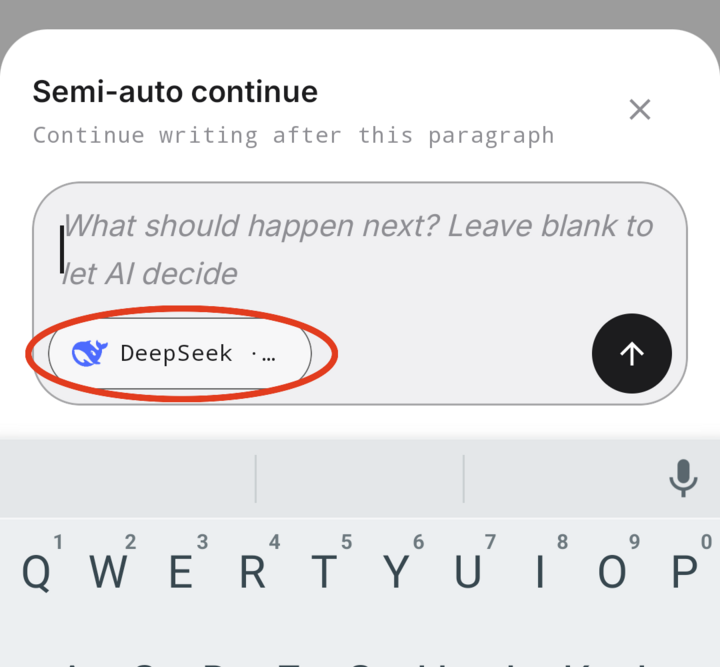
This shortcut is off by default. Enable it under Reader → tap center → Settings → More settings → Paragraph-tail shortcut, then choose image / video / system read aloud / continue. Continue has two modes: full auto (tap to generate immediately) and Semi-auto continue (show the input bar first so you can edit one instruction before generating).
Branches and switching
Tap the page center → Contents. Chapters with alternatives show a branch badge such as ⑂N; open it to preview routes and choose Switch to this route. The original route is labeled Original and archived alternatives are read-only. Create a branch from the selection toolbar or by revisiting a previous story option.
Listen
Tap "Listen" in the bottom dock to open the listening panel, with two tabs (Now playing / Contents):
- Engine: Android system TTS (free and offline) or online speech model (BYOK, higher quality).
- Voice: voices listed by engine, with preview and custom voice ID support.
- Cache: download this chapter / next N chapters / whole book; the same chapter is cached by "chapter + voice + model", so relistening doesn't charge again; cleanup and quota organization are supported.
- Speed and timer: one-tap common speeds, and stop after N minutes.
- Playback controls include previous segment / rewind / replay / fast-forward / next segment. Listening and reading share the same progress, so you can switch back and keep reading.
Bottom dock and settings
Tap the page center. The bottom control pill has four buttons: Contents · Listen · Night · Settings, with current chapter progress shown on the pill. The top bar has Back, balance, Book info, and More. Settings includes:
- Page-turn style: simulation / cover / slide / vertical / none. Vertical is the default scrolling mode; the other modes page horizontally.
- Typography: font size, font family (serif / system / monospace), line width, line height, paragraph spacing.
- Color and brightness: reading color palette, follow-system brightness, eye-protection warmth, and the one-tap Night button.
- AI segment style: background decoration (clean / corner lines / floral corners / stardust), bold, underline. You control how visually distinct AI content is from the original text.
- Other: follow system brightness, eye protection, keep screen on.
Contents has Chapters and Assets tabs; Assets collects media generated for the book. Full-text search is under the top-bar More menu.