
Tutorial · Models and usage
Models and Usage
Foreverse supports BYOK: your API key is encrypted in device-local storage and requests go to the provider/host you configure. Where the official channel is available, signed-in users can also use metered credits. This guide covers setup and the current Request records page.
Add providers and keys
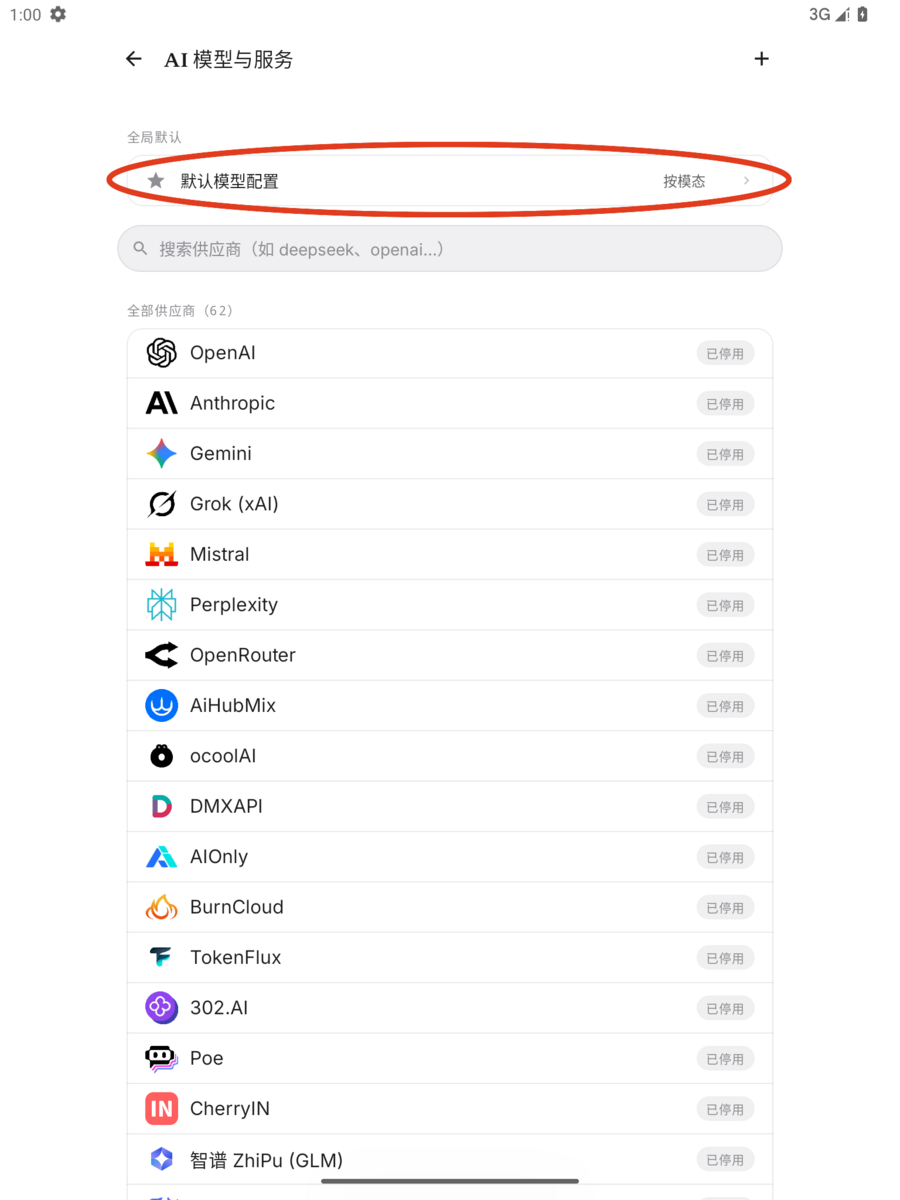
- Entry: Me → AI Models & Services. 60+ preset providers (OpenAI / Anthropic / Gemini / DeepSeek / xAI / Alibaba / MiniMax...) include search.
- Open a provider, paste the key, save it, and run Test connection. Connectivity/capability tests can send a real provider request and may incur a small provider charge; never include the key in screenshots or support logs.
- Custom provider: any OpenAI / Anthropic-compatible endpoint or self-hosted proxy can be added. Choose OpenAI-compatible or Anthropic protocol; the API URL must include the full version prefix, such as
https://api.example.com/v1. The app won't guess it for you. - Security boundary: keys are encrypted, stored only on device, never uploaded, and never written to logs; requests go directly from your phone to the address you configured.
Enable models and set defaults
- Each provider page lists available models, which you can enable or disable one by one. Only enabled models appear in model pickers. You can also add a model ID manually.
- Default model configuration (by modality): set Text, Vision, Image generation, Speech synthesis, Video generation, and Vector/retrieval independently. The Lightweight task model controls background work such as memory extraction, proactive messages, and summaries; when unset, it follows Text.
- Every AI entry point (continue form, chat, Agent) can switch models temporarily without changing global defaults; each entry remembers its last choice.
Official channel
Where the official-channel banner is available, sign in to use built-in models with metered billing: 1 credit = US$0.0001. Official credits and Pro entitlement are separate. Official and BYOK can be mixed—for example, text can use your key while image generation uses the official channel.
API request logs
Open Me → Request records. The same page also lives under Me → Advanced settings → AI Models & Services → API request records.
- Filters: BYOK / official channel and modality (text / vision / image / TTS / video).
- Rows: provider, model, time, usage, and success/failure. Open a row to see the upstream error before retrying.
- Details: status, cost, latency, token/cache fields when the provider reports them, and official-channel credit charges.
- Coverage: records are device-local; signed-out official records may not sync. Agent calls appear only while Record Agent requests is enabled in Agent capabilities.
For failures, start with the status and provider message: 401/403 usually points to credentials/permission, 404 to host/path/model, and 429 to quota or throttling. A failed client screen does not always prove the upstream accepted nothing, so check records and provider usage before repeating an expensive request.