
Tutorial · Agent
Agent and Companion
Open Quick Dock or its workbench to use an Agent that can actually do work: it has four native tools for read / write / edit / exec, operates on your books, cards, and notes inside a controlled workspace, and shows its thinking and every action in the open. Companion is a long-term companion character running on the same foundation.
Assign tasks and read runtime state
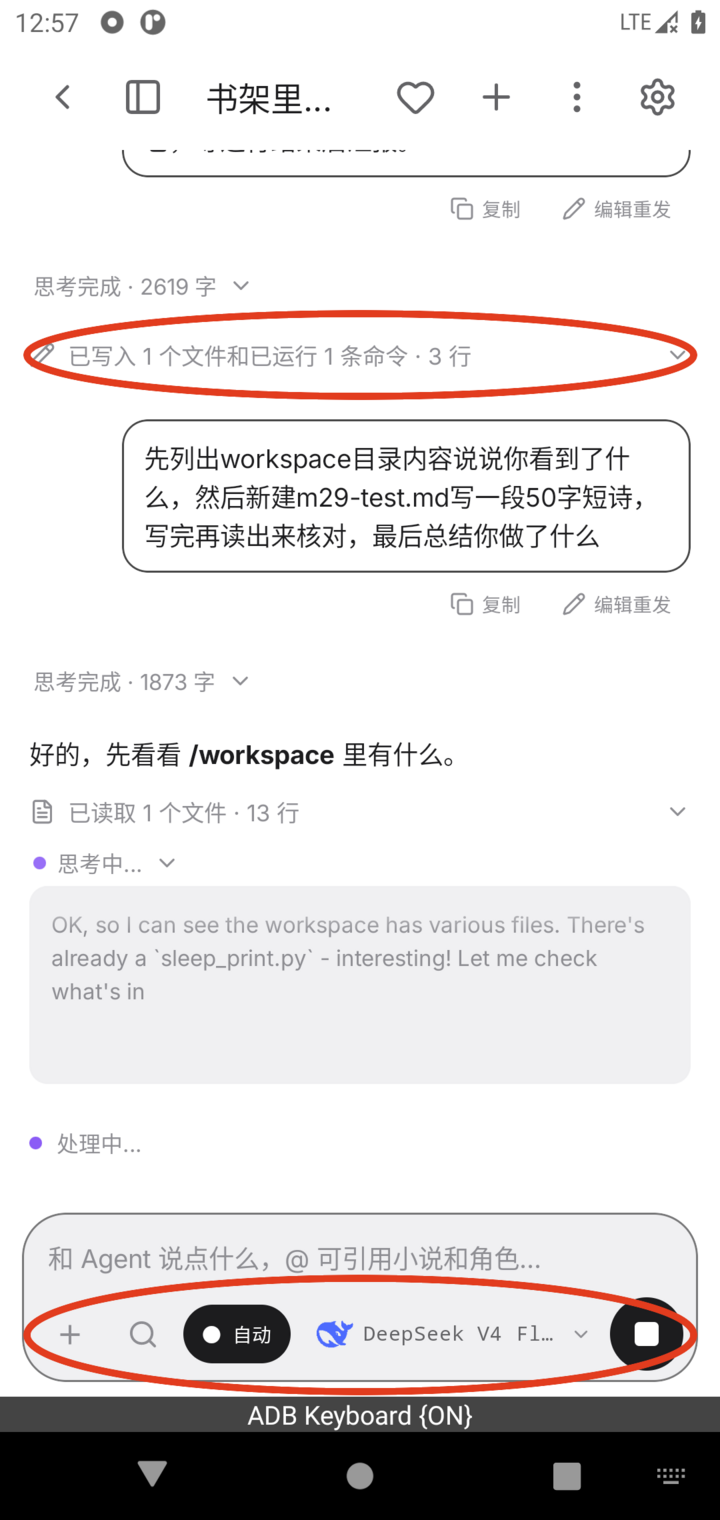
Type plain language into the input: "Read the latest three chapters of Starport Files and add new lore to the worldbook" or "Turn tonight's reading into a one-page note". While it runs, you'll see three kinds of elements:
- Thinking stream: purple-dot "Thinking..." plus a gray live preview. When done, it collapses to "Thinking complete · N words"; tap to review the full text.
- Tool cards: "Read N files · N lines", "Wrote...", "Ran N commands". Tap to see details; supported write actions can be reversed with "Roll back this change".
- Streaming body: Agent's explanatory text.
You can tap Stop at any time; partial content stays, but Stop does not undo finished writes or refund completed model calls. If you leave and come back, reopen the session from Quick Dock or Agent workbench. The input bar lets you switch models and choose Read-only, Confirm, or Auto; keep Confirm for writes until the scope and target are clear.
@ references and cross-module jumps
Type @ to open a list of your novels and character cards, then select one to reference it. After receiving a reference, Agent can directly open that book or card and work on it: "Use @Luo Qi's card to start a new session on the rainy-night route" or "Compare the direction differences between the two @Starport Files branches". One sentence can trigger cross-module work, so you don't need to switch tabs back and forth.
Skill directory and customization
Agent's specialized abilities live in the skill directory. Each skill is a file at /foreverse/skills/<directory>/SKILL.md inside the workspace, describing what to do and what format to output. Skills lazy-load on demand, so unused skills don't take everyday context. Built-in skills include:
- Character card creation: generates a full card by high-scoring community-card standards (persona / greetings / worldbook / beautify), and can fork from an existing card.
- Sticker pack generation, theme creation (outputs .fvtheme.json), memory migration, card rendering, and other co-creation skills.
Customization: write your own SKILL.md into the skills directory, or ask Agent to write one. Change one file and the behavior changes immediately.
Agent inside the Reader
On the reading page, AI-segment actions such as "Edit and regenerate", "Continue from here", and the paragraph-end Semi-auto continue button all open the same lightweight Agent input bar: it remembers drafts and model choices, can be dismissed, and embeds model selection. This means "change one instruction and rewrite this segment" doesn't need the full form.
Companion
A long-term companion character whose local data includes persona, memories, skin, chat history, and related assets. Capability list:
- IM chat shell: borderless WeChat-style interface with split-message playback, typing rhythm, and read receipts.
- Explicit memory: durable facts can become editable memory entries, with manual add/edit/delete on the memory page. Context is still bounded, so review incorrect or missing memories instead of assuming every old message is always in the prompt.
- Rich messages: love notes / countdown dates / mood cards (fv-card), stickers ([[sticker:name]]), and HTML cards. Syntax is in the Beautify spec.
- Proactive messages: when explicitly enabled, Companion can call the configured text/lightweight-task model in selected windows; quiet hours and a daily limit control interruption and cost. Tapping a notification opens the chat.
- Companion backup: Companion profile → Export companion backup creates a zip with persona, memories, skin, and chat history; restore it from Home → Companions → Manage → Restore companion backup. Treat the zip as sensitive private data.